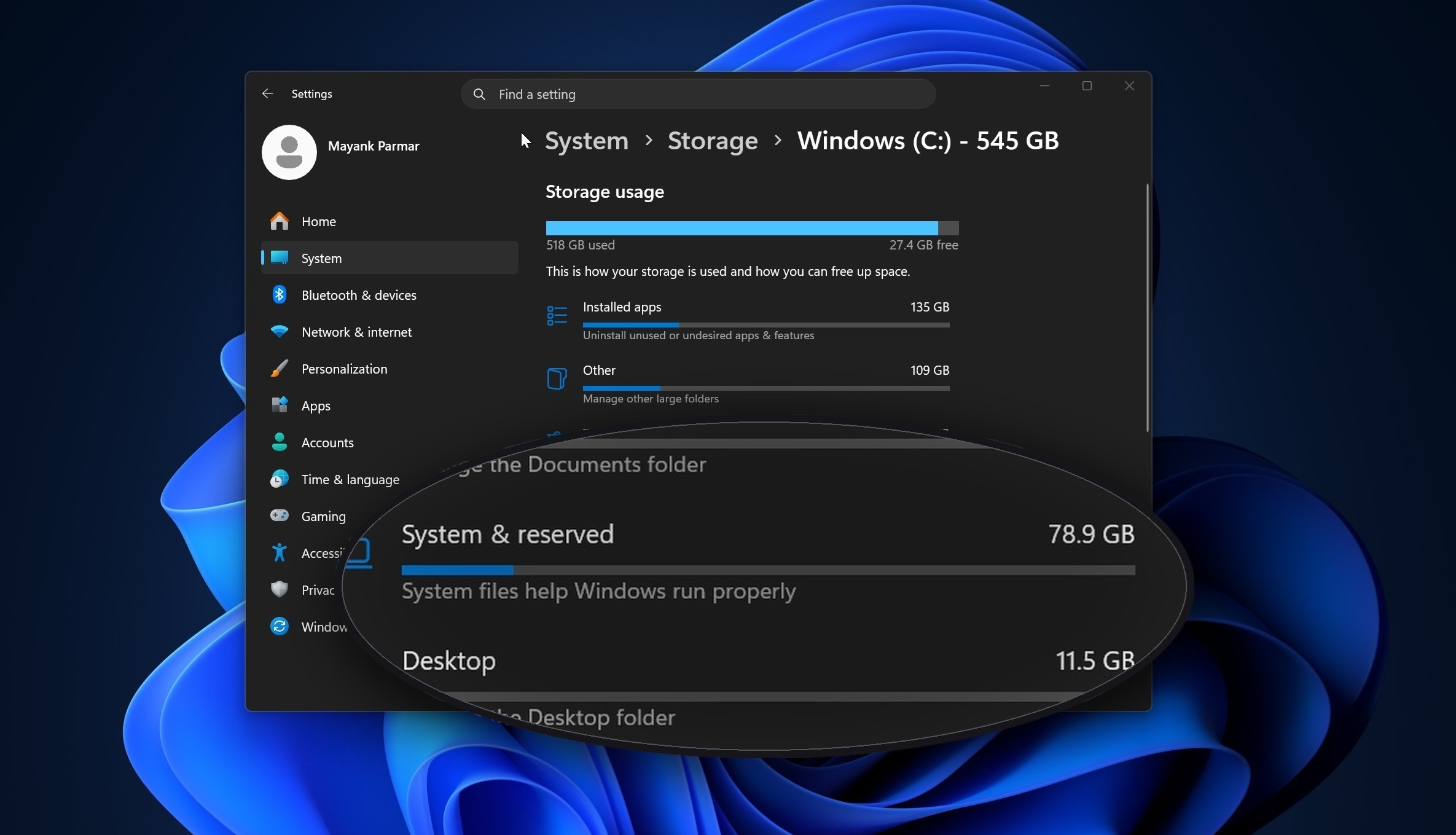
Personally, I have never seen this many issues with Windows like today. Even way back in the Windows Vista days. Woah, Windows Vista will be 20 years old in November…
If you are forced to still be on Windows 11.
This file can be found in the following directory,
C:\ProgramData\Microsoft\Windows\CapabilityAccessManager\
Then see if it shows a huge file size.
Windows Latest found that one particular file called “CapabilityAccessManager.db-wal” can use most of your system storage.
If your PC is affected, the safest fix is to install Windows 11 KB5095093 from Windows Update, or wait for the July 2026 Patch Tuesday update, where the fix is expected to roll out automatically.
Good information. However, the safest fix would be to delete the OS and install literally anything else (https://hannahmontana.sourceforge.net/). But alas, due to work constraints I understand some are stuck with Windows.
The fortunate thing with “windows because of work constraints” is that this is a work problem. Not a me problem.
Exactly. Sadly I need windows on my laptop for college which is voluntary, so I’m stuck with it until I’m done.
You mean voluntary in the sense that college is voluntary? By a similar logic, so is work?
VM?
I really wanna install Linux on my surface pro X :(
Can you not? I’ve installed linux on surface laptops before. Would have thought it’d be the same for their tabtops.
Misread the inflection on “Can you not?” and snorted
Same, I felt attacked for a second there.
I was genuinely curious! I’d never attack someone randomly online like that.
Ya idiot.
Nah, x is the weird Arm based one. I wonder if I could at least donate money or my device for the cause.
Darn, I was thinking the Arm processor might have caused it. I think the surface laptop 6 is arm based. I wonder if that’d have the same problem.
Perhaps read about all the garbage Linux puts out. -They don’t do the testing, QA, or slow roll outs that Windows does.
Lol
I’ll have what he’s smoking.
It’s kinda scary how they let just any old idiot use the internet.
Pass me whatever you’re on mate
Luckily my work still lets me use Win10 for as long as they give safety updates. Unfortunately for me, it‘s still Windows.
I messed up with one computer. It is a huge server with RAID on Windows 11 and like 100TB’s of storage on it… No way I was going to risk it and accidentally erase the used storage while installing Linux. That is the only one on Windows 11 for me. If it was just 5TB’s or something, I would just get an external hard drive to copy everything. But it is much more than that, not all of the 100TB’s is used though. It has to sit on Windows 11.
Don’t worry. Windows will auto update or update your storage driver and you will loose the data anyway! Good luck while it lasts.
Disconnect the drives and insert a new one and install Linux. Then reconnect the drives.
Or just unplug the SAS cable or whatever, depending on the hardware.
That’s the thing, will the new hardware read the RAID setup? OMG I think they are actually set up on legacy and GPT.
That sounds like a problem that you should deal with even if you stay on Windows 😄 Maybe I just enjoy organizing things
Do you have over 60TB’s of storage that you need like me?
Well, is horse porn a want or a need?
I do not and so I shouldn’t be one to judge
Is it data that could be recovered if needed? That’s where my concern is coming from. Not being able to back it up to fix OS issues might mean that you can’t back it up at all
Over 60,000 GB’s. As stated, it is all in RAID. Unless I get a giant external one. Which I don’t even know if that exists to buy. It would be super expensive if so.
Not talking here about Linux anymore. If you have the data in only one site, and the data is irreplaceable, you have a problem right now. Having it in a RAID gives you some breathing room, but you still should plan and execute a remote backup, somehow. At least for the really critical data. Fire, floods and other phenomena are hard or impossible to predict, and you could lose everything. If it’s not that critical, and you simply don’t want the hassle of moving 60TB, I can really empathize with that.
True, if anything happens to the drives, it is fucked.
Hmmm. Let me check to see if I’m affected/infected.
Nope! No windows anymore. All good.
What do you use, btw
We know it isn’t Arch because they world have already told us.
I was looking for the elusive low key arch user 😂
Mint, Bazzite and Debian
Also on linux myself, but clearly I still have this issue

Work has rolled everyone over to Windows 11 and I have to agree with many of the other replies. It’s the most half baked OS they’ve released in a really long time. Really idiotic stuff happens… Like the snapshot and calculator tools just randomly refusing to start. And Outlook randomly refuses to recognize certain key inputs for a few minutes at a time (while other running apps continue to work just fine). Just really annoying.
Don’t think it’s just an Outlook thing, same thing happened to me in the file explorer. Weird thing is I opened another explorer window and that worked fine, while at the same time the other window was still unresponsive.
Just windows 11 failing at windows sometimes. ¯\_(ツ)_/¯
I too have experienced the funky unresponsive File Explorer bug. A second window worked even while the first was still unresponsive.
My scrollwheel input from my mouse will just stop working for a bit in a certain window. But will continue working in a different window.
Outlook classic is one of the better examples of a legacy app with tons of integration capabilities that should have been overhauled years ago. The way plugins work is probably related to your issues.
The modern Outlook app is significantly more reliable but has its own quirks that are pretty painful when coming from classic.
They are just “vibe coding” updates now.
And of course, it’s crap.
I am not affected on my Ubuntu installation
Vista was not bad. It gets a lot of hate, but Vista SP1 was rock solid. But 7 came shortly after and Vista never had the Aero Snap/Peek stuff and that was game-changing. 7 should have been a Vista service pack. Vista got shafted.
There were also driver issues, but that’s the fault of lazy vendors. Vista itself was fine, but only just fine.
I like Windows 11 at work well enough (and I have about 30 years of experience with that platform) but at home I’m a happy post-PC Mac user. Honestly there are a couple things Windows does better, and I’m familiar with the platform. But Microsoft needs to learn how to get out of their own way, and the way of power users.
One of the problems with Vista was the push for vendors to mark their machines as Vista ready at all costs, where the minimum requirements were way too low, so a lot of people ended up with their first Vista experience being an anemic one, as opposed to one with the right amount of system power.
Vista was also the first time we saw the UAC elevated privilege pop up which seemed to pop for just the simplest of reasons. Mostly because devs were putting too much of user config in the program files directory, or in the windows system directory. This made it so anytime you changed a user preference the UAC would come and ruin your day. Now we just have the devs shoving everything and anything into %AppData% instead.
Yeah, the one and only PC on which I ever used Vista was a comically under powered laptop that my Mum bought. If it was running XP it would have been solid, but alas, it had 512mb RAM and Vista was thiiiirsty.
Yeah that was definitely one of the things I saw when I was a tech support agent for a PC manufacturer, Vista was very ram hungry and the machines that could be labeled “Vista ready” definitely were not ready for the hunger
I bought a machine right before 7 launched to replace my XP machine. Vista SP2 was solid by then. I ran it for over a year because it was extremely stable.
I waited a bit over a year to install 7 on the machine when it’s SP1 came out.
Windows 7 ran well on machines that ran Vista barely usable. Vista deserved the hate it got.
The new Mac Tahoe OS has a weird bug as well.
The wallpaper extention copies the image/video you want to use into a cache and, if you have a wallpaper that changes, it caches every single image you use. If you’re drawing from a folder that has 100GB worth of images, it will cache 100GB worth of images…and fill up your hard drive. I was drawing from a folder that has 400GB of images, and it was crashing apps because the cache was taking up all my disk space.
I’ve had to stop rotating my wallpaper and go with something really simple, and i really miss being able to use all my images.
How many images is 400GB? That’s in incredible wallpaper library
About 8500 images.
Microsoft be like: Storage has gotten very expensive? Hold my beer!
As someone who has been around since the DOS days, I can tell you that while there has been an uptick in more severe and ridiculous bugs the last few years, we are definitely nowhere even close to MSs worst.
Really this is just another loop around the old ‘fire everyone with experience and hire cheaper labor’ cycle that they like to do on a regular loop.That is unsettling news. I quickly ran uname -a on all my machines. I was lucky enough to find out that I’m unaffected.
An Sqlite write-ahead log file? You can probably flush it manually.
Yea, you can’t just select and delete it, even if you are the Admin. It needs further action.
Fortunately I don’t have this problem on any of my personal machines because I formatted all my Windows drives and migrated everything to Linux, which has been a far better experience. Running Bazzite on my gaming machine and Mint on my general use laptop. Also SteamOS on my handheld. Would recommend.
“It looks like you’re running out of storage space. Unlock the full potential of your hard drive using Windows Space. Please select a payment plan that best suits your needs.”
LOL!
I just recently dealt with this on a coworkers pc. No doubt it will balloon back up and require me to remove it again. Theirs was at 96 gb and their drive was 500gb.
Binbows back at it again lmfao