You must log in or register to comment.
deleted by creator
Welcome to modern astroturfing in the social media age.
There is a build page on the github for the device.
deleted by creator
There’s no such link. Can’t even find one through Google
Is there? Mind sharing the link?
I’ll find it after Christmas. I got a fork a bit ago when looking at the code.
I think its based on https://github.com/atomic14/diy-esp32-epub-reader
Build logs: https://hackaday.io/project/204323-diptyx-e-reader
Those aren’t build logs. Those are “I took an open source software package and put commercial hardware around it.”
Which is fine, since it’s MIT software (and why I push for GPL, personally). What’s not fine is a creator calling their commercial product “open” or “DIY” without a BOM or build log.
I would revise the post title regardless of what the author calls it, personally.
I posted this as a comment on the creator’s post. Will have to see if they respond.
I see “open” in the title, but no git or Bill of Materials (BOM) links. Is this actually open? Or based on other’s open efforts?
I don’t like the fact that it has two displays. It’s unnecessary and makes it thicker and heavier.
How else would it recreate a book unless it had a folding display which would be even worse?
Books are made like this because it’s impossible to make them any other way, but a digital device can have just one “page” since you read one page at time like Kindles and Kobos
The other option is a scroll. historicaly I’m told a book was always a scroll and the factor we now call a book was a codex. (I don’t know how to verify this)
For some people, recreating the form factor of a book is the point, regardless of its convenience or cost. I’m sure whoever put this thing together was quite aware of how mainstream e-readers are built and didn’t want that, or they would have bought a Kindle or a Kobo.
I can imagine a future device with an e-ink page that’s so thin and flexible that it looks and feels like a paper book with magic changing text. I don’t know how many consumers would pay a premium for that, but I would definitely buy my wife one.
Go old school and have it recreate a scroll. Really, not having to shift your head/eyes when reading is a plus with r-readers.
Nevermind the fact most readers and tablets come -with- a cover … So its almost like a book anyway. Which people fold behind the page. Like a book. What was that extra screen doing again?
a cover … Which people fold behind the page. Like a book.
Ho ho hold the fuck up
Mind blown.
deleted by creator
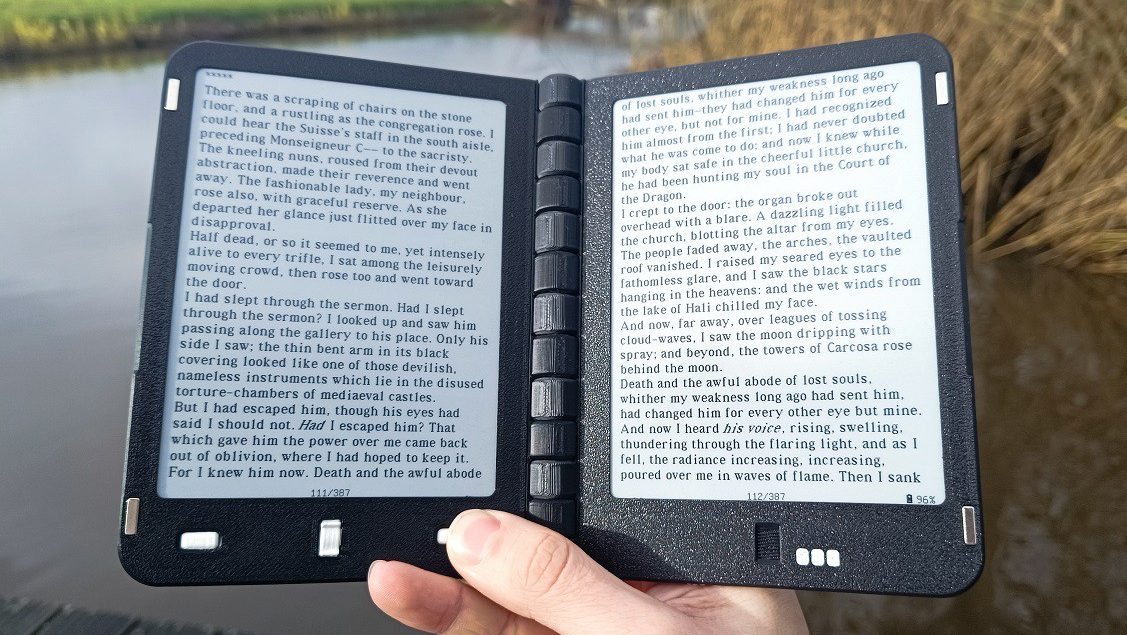
pair of 648×480 e-paper displays
Um lol no. I could see using a pair of Inkplate 10’s connected by (at least metaphorical)) duct tape. Doesn’t seem worth mucking with special hardware.
Every affordable e-reader I know of is simply too small though. I mostly want to read stuff like ArXiV preprints (A4 sized pdf’s) so would want at least a 13" screen. Someone a few days ago posted a link to a 14" Android tablet with a semi-reflective display at around $300. It seemed interesting but I’d rather degoogle.
There are some hinged Waveshare displays that look nice but they are regular TFT displays so wouldn’t be great for a portable e-reader with long battery time:
https://www.waveshare.com/product/displays/15.6inch-dual-monitor.htm
I hope you get what you want. Me I want something I could put in my pocket.
The small kobo kinda fits in a jean pocket, easily in cargo shorts or inside jacket pocket. Only comfortable for reading novels though. I prefer a little bigger even if it isnt pocket size.
I do like the old kobos. Fully hackable.
I like dedicated devices for things rather than all in ones. If you have the money of course.
Oh hmm, I just use my phone for that. It doesn’t seem worth having an additional, limited purpose device. I assume a 7" e-reader is too big for a pocket.
The Inkplate 10 isn’t pocketable but it’s very light, easy to put in your backpack or whatever. I just wish they had a 13" version. The 13" Ipad Air is really very nice if you don’t mind Apple products.
There are also some folding phones now with largish screens. A buddy of mine has one and it’s nice. Too expensive for me though, and it’s more Android.
Yeah most 7" readers have the page turning buttons on the side which usually makes the device too wide for pockets.
The 6" readers fit my pocket quite well… So a foldable dual screen 6" sound like a pretty nice upgrade.
Most of what I use my readers for are reflowable text like epubs… But I guess if you could show a single page from a PDF across both screens then it might actually be big enough to be able to read while still being pocketable… You would probably want to go with the high resolution e-ink screens, like the one in the Kobo Clara HD (1072 x 1448). A combined resolution of two of those would be 2144 x 1448,
Being able to fold down a larger “sheet” display so that it fit in a pocket would be pretty cool. Having extra room for reading things like maps and comic books is so much better than pinching and zooming on a pocket sized display. What you call limited purpose, I call functional design. I’m kind of over all-in-one devices. They’ve turned into Jack of all trades, but master of none.
Obviously that’s not what this device is, but it got me thinking about why I’d want a device with multiple e-ink displays or a foldable display.
My buddy’s folding Samsung phone is really cool and you might look into it. It unfolds to a single screen of maybe 10" diagonal and square perspective. I think for full page PDFs though, I need something bigger so I’ve given up on pocketability.
Hello there, just scrolling through and I saw your comment. You seem to know a bit about this topic. I’m currently thinking of buying a reader as I lost mine some time ago. I used a kobo and a kindle in the past and didn’t see much difference. However, this thing about reading papers seems really cool. I have tried in the past reading PDFs on those readers without much success.
Do you think you have good options for reading articles/manuals? Consider I end up printing about 50 pages a day in articles I read. If I can turn that into something digital that’d be cool.
If an 8-inch screen is enough for you, then I recommend either the Pocketbook Inkpad 4, or the Pocketbook Color 3 if you want color. They run Linux and have a very capable PDF Reader (especially compared to Kindles)
If you want an even bigger screen then sadly they start to get very expensive, and usually ship with an already outdated version of Android and an underpowered SOC. And they also have the terrible standby battery life you would expect from an Android device
I guess the size is good to me for reading. I guess the kindle and kobo I used to have were even smaller than that. For reading books that’s quite good to me and I never felt I needed something larger.
However, when I tried to read PDFs I had lots of problems. The readers either would show the full A4 page in the screen, which would make it unreadable, or show just a piece of the page and it would then be difficult to pan. I remember I had tried using some tools which would break up the PDF pages into pages which would be visualizable in such a screen, but that did not work too well especially when reading articles with two column layouts.
Ideally articles would be available as ePub, but that’s quite rare. The main point would be: if I get one such tool to read articles I can dedicate it to just that. But, I need it to be easy for such purpose: I don’t want to be panning up and down a page all the time. I don’t know whether that is possible and how that could work however, because indeed resizing is not one of the objectives of PDF.
I’ve had luck with web2epub on Firefox. Web articles become epubs which work well with eink readers. PDF is such a storage format cause its many formats under a trench coat. If you find a good solution for those let me know. Even calibre isn’t perfect.
I’m still looking for a good answer myself! There are lots of possibilities but all have drawbacks from my perspective. I guess the 13" Onyx Boox sounds nice if you don’t mind the cost. I haven’t tried it though. Same with the 14" TCL Android tablet if you don’t mind Android.
Give PineTab a look. Pine64 makes open source hardware that is pretty cool.
This? https://pine64.org/devices/pinetab/
It’s just 10" and looks like an old design. Micro USB, oops. The Inkplate is 10" ESP32 epaper so it uses very little power. Alternatively there are tablet-style x86 laptops and I almost bought one last year. Now the price is way up due to DRAM shortages and so on, oops. I have some scrounged HDMI monitors so I want to try using one in portrait mode with my raspberry pi 400. If that works I could see getting one of the Waveshare dual screen monitors and maybe a Pi 500+.
EInk gets expensive fast as the size gets bigger. At 10” its hard not to just use an lcd and bigger battery.
Great. Now i can get that “real book feeling” of wrestling the books pages to lie flat enough for me to read them as I lay down.
Not a big fan of having 2 screens.
A huge fan of ESP32 DIY E-Reader!
The only reason I’d want 2 “pages” is so I could close it to protect the screen(s)… but that’s exactly what covers are for.
Apart from the tiny minority of people who might prefer the form factor/“book feel”, are there any actual advantages to having 2 screens for general reading?
It’s probably just for the people who want it. I have thought about how much nicer two pages would be in the past for this reason and for displaying sheet music.
I did consider less common uses like that, which is why I specified “general reading”. I prefer paper for my sheet music, but I’d choose something with a faster refresh rate than e-ink if I had to use something with a screen anyway.
Could also be useful for doing research with ebooks. Maybe show a list of bookmarks or the table of contents on one screen and the text on the other screen. Or you could compare different texts easier, showing one on one screen and one on the other. Or use one screen for notes. But I guess people that need to actually do productive research will use a desktop anyways.
I would like to be able to get comics and manga in ebook form. I’ve always had to go with the print versions because two-page spreads end up looking bad/being more confusing to read on my ereader thanks to the single page display.
It would probably work really well for graphic novels, since they do occasionally have panels or illustrations that span both pages.
Look. Hackaday… If it’s a slow week… We get it. Take a day off. We still like you. Just… Less of this please.
Why not hundreds of screens so you can present all pages of a book at the same time and you just skip through the screen? Would be so much more convenient and innovative!
I’d get a whole bunch of these and keep a different book on each one, so you could just pick it up and read it. But it’ll never work, it’s too much trouble to keep them all charged.
That’s very smart!
I think I see a business opportunity here. One could Design covers for each device so that you can identify them easily when they are standing next to each other. I bet these can be placed a lot a similar price as phone shells. If only we could find a solution to the charging problem.
Why DIDN’T Amazon do that for the Kindle?
Just I am waiting for Amazon to one day create something like Boox Palma 1/2 but that makes too much sense to give us something we can put in our pocket. I don’t know why they lack innovation. One day though…
oo we can bring back 2 page spreads, probably 2x price though.
Great idea. Less having to turn pages.
I read for hours on my tablet just fine. I don’t even see the need for e-ink displays, let alone this form factor. Also, I find the tablet easier to hold for hours, compared to a book.
In spite of all that, I kind of want one, I’ll admit. I have a 3D printer, maybe I’ll make one.
E-paper is easier to use outside or in bright light, and the battery tends to last longer. Anecdotally, it also doesn’t hurt my eyes as much.
And by “tending to last longer” it is good to note that it almost always lasts 5x-10x longer, as in you only need to charge it once a month instead of every few days with medium reading, depending on backlight usage.
When I only read a few pages a day because of my schedule, my battery lasts over 6 months easily. Meanwhile my unused iPad has to be charged every week or so even if it is used 0 minutes.
Yeah, for sure. I mean, it depends a little bit on the model of the e-reader (color takes more out of it, etc), but I only charge my Boox every other week, and I take notes on it, read on it, the works.
I’ve tried. I really don’t want to have another “gadget” in my carbon footprint, but can’t avoid it. I’ve read in my tablet, it’s just too heavy. So, it’s gonna be a PC, a laptop, a tablet, a cellphone, and an eBook reader -_-
The only good side is I use them way more, I think, than your average person. The PC is almost ten years old, the laptop is like six yo, my cellphone is getting to 4 years of use, but the tablet is only a couple of years old and it was supposed to serve as a reader. Also, if I use my tablet just to read, it’s a waste of energy; eink devices are typically very efficient.
I’m just here to point out that the fact you genuinely care about your carbon footprint probably puts you ahead of 80% of the population, and the fact that it has materially affected your device choices probably puts you ahead of 80% of the remainder.
There’s definitely a unique satisfaction that comes from filling tech needs with hardware that already exists, and which does a great job at it too.
That goes across hobbies and mediums too. I just finished a big outdoor carpentry project where I was able to find perfect long-term uses for pieces of wood from The Initial Build in the construction of The New Hotness.
You got me curious about that New Hotness, NGL. Thank you for your kind comment.
Waste of energy.
looks like shit no thanks